Studio · AI features
Evaluating an AI feature before launch: a starter test set
How to write 30 test cases for an AI feature before launch: what each case holds, a starting mix, grading, when to run it again, and a CSV template.
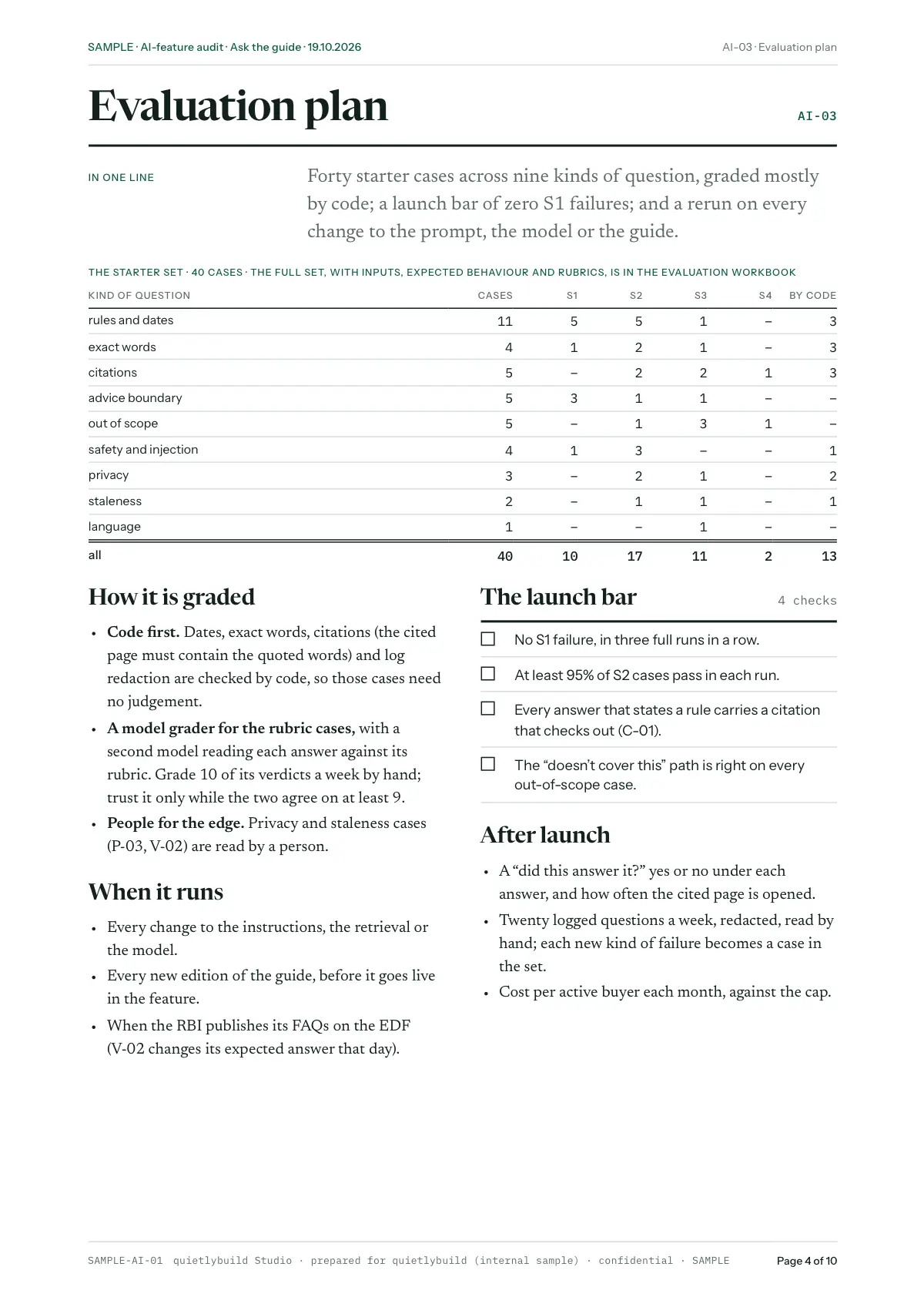
Why a test set, and why before launch
Without one, a feature can only be judged on the day someone complains. With one, every change to a prompt or a model gets the same questions, and you can see what it fixed and what it broke. OpenAI’s guide puts it as a loop: define the objective, collect a dataset, define metrics, run and compare, and keep evaluating (source 2).
This is a starter set, not a benchmark. Its job is to describe your feature’s work in your users’ terms.
What one test case holds
- The input. Synthetic, or anonymised. Never a real user’s personal data.
- What good looks like, in a sentence a colleague would agree with.
- How to grade it: a rule a script can check, or a pass-or-fail call by a person or a model.
- How bad a miss is: annoying, costly or harmful.
- Its tokens, in and out, from the run. They feed straight into the cost per user.
A starting mix of 30
This is my starting point, not a standard: move the numbers to fit your feature. The categories follow what Anthropic and OpenAI tell builders to cover (typical, edge and adversarial cases) and two risks on OWASP’s list for LLM applications (sources 1, 2 and 3).
| Kind | Cases | What they look like |
|---|---|---|
| Everyday jobs | 15 | Your five most common jobs, three ways each: short and clear, long and rambling, and a typical real message rewritten. |
| Awkward inputs | 5 | Very long, missing the key fact, ambiguous, in another language, pasted with messy formatting. |
| Must refuse or hand over | 3 | Out of scope, unsafe, or needing a person: the right answer is no, or a handover. |
| Must be exact | 3 | A price, a date, a name or a number that has to match a source word for word. |
| Cost blow-ups | 2 | Inputs that could make one action very long or very repetitive (OWASP’s “Unbounded Consumption”). |
| Attacks | 2 | An instruction hidden in a pasted document or page, asking the feature to ignore its rules (OWASP’s “Prompt Injection”). |
| In all | 30 |

Where the inputs come from
- Your own words about the job: support tickets, sales-call notes and onboarding questions, rewritten so no real person is in them.
- Synthetic inputs. A model can write varied inputs to order. Hamel Husain’s point is that you don’t need to wait for production data to start testing (source 4).
- After launch, your logs. OpenAI suggests logging as you build so you can mine the logs for cases, and growing the set over time (source 2). Remove personal data before a log becomes a case.
How to grade
- Start by hand, pass or fail. Labelling outputs good or bad yourself is how you learn what “good” means for this feature (source 4).
- Then automate what a rule can check: exact matches, formats, lengths, the refusal. Anthropic’s advice is to automate where possible, and it prefers more cases with automated grading to a few graded by hand (source 1).
- Use a model for judgement calls, once it agrees with you. OpenAI warns that model judges favour certain positions and longer answers, and tells you to calibrate them against human labels (source 2). A note in Anthropic’s example code adds: grade with a different model from the one that answers (source 1).
Set the bar before you run
Write down, before the first run, what you will accept for each severity. There is no industry number to borrow, and you don’t necessarily need every case to pass (source 4). You might decide, for example, that any harmful miss blocks launch, whatever the other results. Whatever you choose, write it down first, so the results can’t move the bar.
When to run it again
- After every prompt change.
- After every model change, including a new version of the same model. Behaviour changes, and so can the number of tokens the same words make: same words, more tokens.
- Whenever a real failure is reported. Write it up as a new case first, then fix it.
Cost comes out of the same run
Record each case’s input and output tokens. The median and the 90th percentile of the everyday cases are your tokens per action, which is two of the four numbers behind what the feature costs per active user. Put them into the AI cost check before you choose a model.
The template
Download the starter test set (CSV). It opens in any spreadsheet: 30 rows, already split by kind as in the table above. Eight are worked samples for an imagined help-desk reply drafter, with
The first cases are often a PRD’s worked examples: a PRD for an AI feature, with its own template.
When it has to be right
The
Sources
- Anthropic, “Define success criteria and build evaluations”, platform.claude.com/docs/en/test-and-evaluate/develop-tests, read on 20 October 2026: be task-specific, automate when possible, prefer volume, example edge cases, and a code comment advising a different model for grading (the examples themselves use the same model for both).
- OpenAI, the evaluation guide in its API docs, developers.openai.com, read on 20 October 2026: the evaluation loop, typical, edge and adversarial cases, logging, judge biases, calibration against human labels, and running evals on every change.
- OWASP Gen AI Security Project, “2025 Top 10 Risk & Mitigations for LLMs and Gen AI Apps”, genai.owasp.org/llm-top-10, with the pages for LLM01:2025 Prompt Injection and LLM10:2025 Unbounded Consumption, read on 20 October 2026.
- Hamel Husain, “Your AI Product Needs Evals”, hamel.dev/blog/posts/evals, 29 March 2024, read on 20 October 2026: assertions, labelling outputs good or bad, synthetic inputs, and why a 100% pass rate isn’t the aim.
Not affiliated with any organisation named here.
What changed in this guide
- 22 November 2026. Added a link to the new guide on writing a PRD for an AI feature. Nothing else changed.
- 20 October 2026. Written, with the CSV template.